
Purchase orders from your buyers' procurement systems, straight into Shopify.
Punchout Station lets business buyers shop your store from inside SAP Ariba, Coupa, JAGGAER, OnCare, Agora and other procurement systems. Their approved purchase orders arrive in Shopify as orders, on the right company account, with the right prices and payment terms.
Coming soon to the Shopify App Store.
How it works
Big buyers order through their procurement system, not your checkout. Punchout Station connects the two.
The buyer punches out
From their procurement system, the buyer opens your store and shops as usual, except that checkout is replaced by a Return cart button.
The cart goes back for approval
The cart returns to their system with your prices, units and product codes, where it goes through their approvals.
The PO becomes a Shopify order
The approved purchase order is sent to your store and becomes a Shopify order for the buyer's company, ready to fulfil.
Built for B2B on Shopify
The details that make procurement orders go through first time, learned from real healthcare supply orders.
Orders land on the right account
Each buyer maps to a Shopify B2B company, contact and location, with ship-to codes matched to locations. Stores without B2B can send a buyer's orders to one customer.
Payment terms decided up front
Terms come from the buyer's profile or the company location, else Due on receipt. A purchase order is never marked as paid by mistake.
Your prices, both ways
Carts go back with your Shopify prices and any per-buyer discount. If a PO price differs, the PO wins and the difference is noted.
Cases and pack sizes
Sell by the case (CS or CA) or by the item, and read POs in EA, CS, CA, PK or pack sizes like 6/CS, the way healthcare buyers send them.
Test before you go live
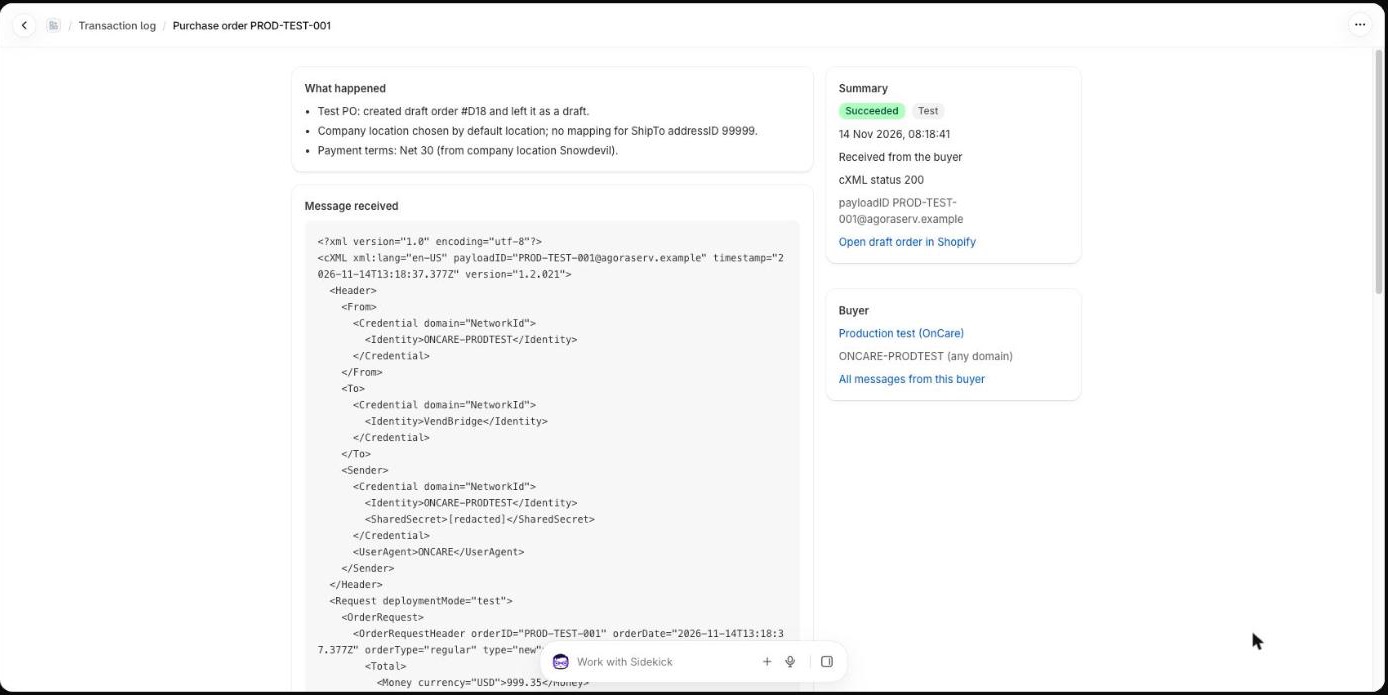
A built-in tester plays the buyer's system: shop, return the cart, send a test PO. Test orders stay as drafts tagged PunchOut test.
A log that explains itself
Every session and PO is logged with a plain-English explanation of what happened and what to fix, next to the raw cXML.
Duplicates handled
A PO sent twice, with the same payload ID or PO number, is acknowledged without creating a second order.
Set up in minutes
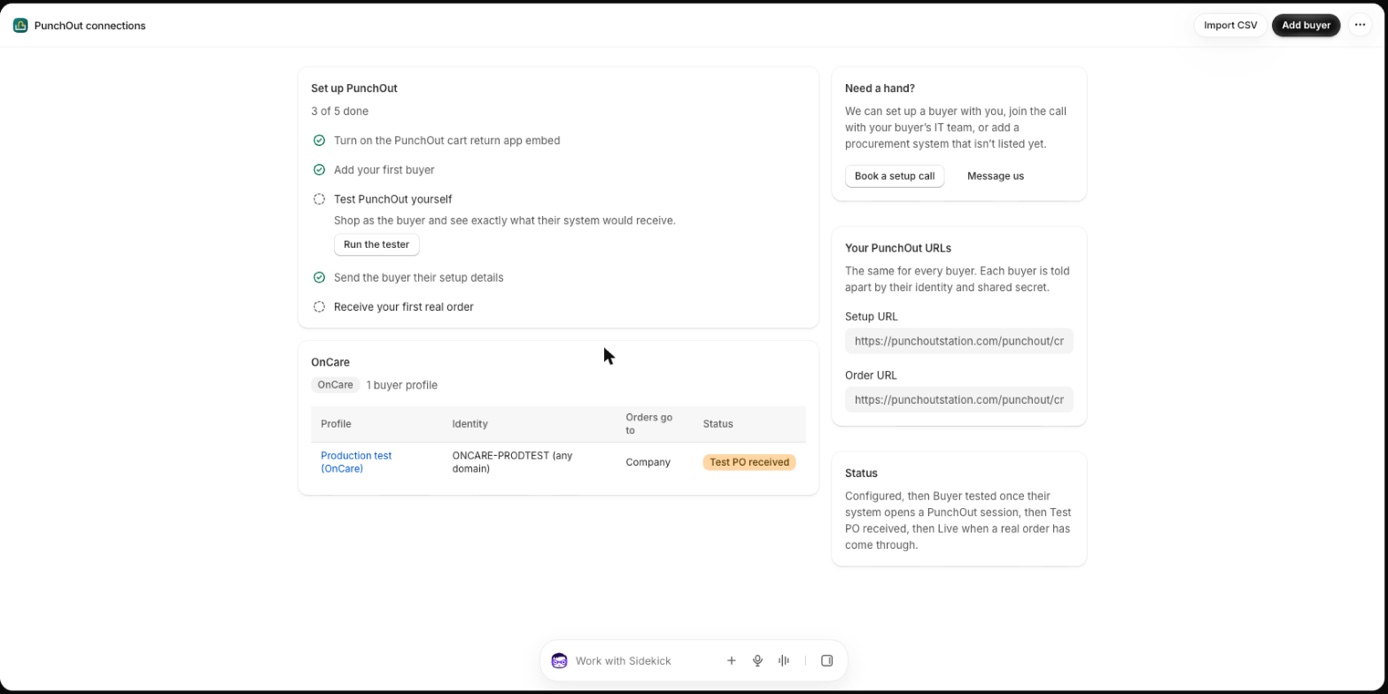
Ready-made settings for common procurement systems, a CSV import for many buyers, and a setup email you can send straight to the buyer.
Careful with data
Shared secrets, tokens and logged messages are encrypted. Raw messages are deleted after 90 days, and Shopify privacy requests are handled.
Works with the systems your buyers use
Ready-made settings for these platforms, and a general setting for any system that speaks cXML PunchOut.
- SAP Ariba
- Coupa
- JAGGAER
- OnCare
- Agora
- ADELPO
- Procurement Partners
- Other cXML systems
Product names are trademarks of their owners and are used only to describe compatibility.
See it in your Shopify admin
Free PunchOut tester
Test any supplier's PunchOut endpoint as a procurement system would, or paste a cXML message to see what's wrong with it.
Questions
Do I need Shopify B2B?
It works best with Shopify B2B companies, locations and payment terms. Without B2B, each buyer's orders go to one customer you choose.
What happens when a purchase order arrives?
A real PO becomes a Shopify order with its payment terms, ready to fulfil. A test PO stays as a draft order tagged PunchOut test. A PO sent twice doesn't create a second order. Change and cancel orders are logged for you to handle by hand.
Will ordinary shoppers see anything different?
No. The Return cart bar only appears for a buyer in a PunchOut session. Everyone else shops and checks out as usual.
How do I connect a buyer?
Add the buyer with their procurement system's settings, then send them your setup details from the app. Their IT team enters these in their system. The setup guide walks through each step.
How is my data handled?
Buyers' shared secrets, Shopify tokens and logged messages are encrypted at rest, and raw messages are deleted after 90 days. See the privacy policy.
Ready to take PunchOut orders?
Book a call: we'll set up your first buyer with you, and join the call with their IT team.